Excel Monitor, ready for factory floors.
Put one tab of your plant’s Excel workbook on the floor TV, as a rotating wall-board your team can read from across the room. A license is a key you paste into the app, and once it’s in, the board works fully offline.
Every plan includes all seven slides and the PM_Settings customization tab.
Licensing and subscriptions
Choose a subscription that fits your rollout. Each license can be installed on up to 4 devices, and every PC that drives a TV counts as one. Pick a plan and your email opens with the plan and price in the subject line; your license key comes back by email as one line of text.
-
Quarterly
Ideal for pilots and phased rollouts.
Good when you expect changes every few months.
- Key-based access control.
- Up to 4 PCs per license.
Recommended for controlled pilots.
-
Annual
Best value for full deployments.
Stable for operational environments and scheduled maintenance.
- Everything in Quarterly.
- Better fit for multi-site standardization.
Recommended once the layout is standardized.
-
- All seven slides and the PM_Settings tab.
- Up to 4 PCs per license.
Plans aren’t showing? Email for current pricing.
The app is a free download, but it stays locked until a license key is added: there’s no free trial. Download it here.
Built for a TV that runs all day
No telemetry, no online license checks and nothing to sign in to. Until a key is added, the license screen shows these same prices, read from this website.
Privacy
Local-first. No telemetry. No external dashboards.
Stable deployment
Built for long runtimes on dedicated displays.
Licensing
Key-based access control for authorized devices.
What you’re licensing
Screenshots of the board as it runs today, scaled to fit whatever TV it’s on. Demo data for a made-up plant.
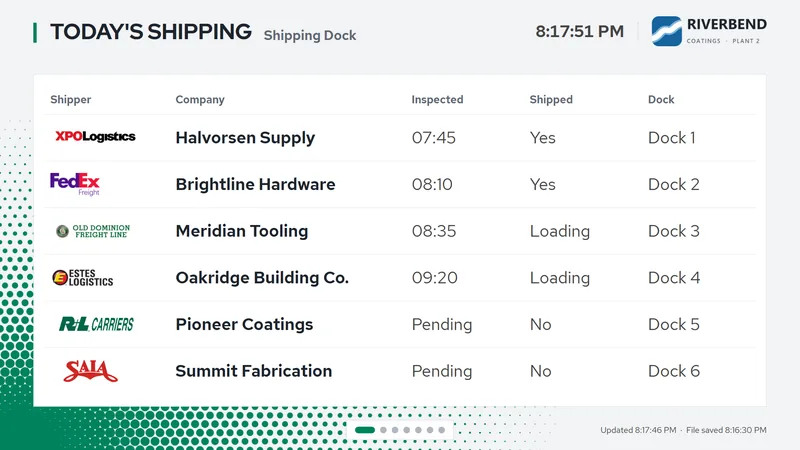
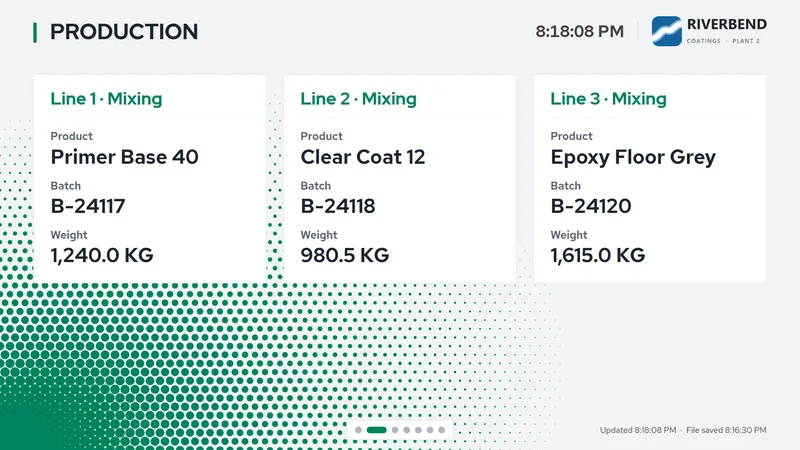
Full walkthrough video: setting up a TV, connecting the workbook, and the board running on the floor.